Overview
Browsing online can be difficult and annoying. Ads, scams, bad user interfaces, and paywalls make browsing the internet a pain. This list is here to help! These are a few of my favorite Chrome and Edge browser extensions that make browsing the web just a little bit easier.
Browsing & Ads
uBlock Origin Lite
 | This extension removes annoying ads. A must have for visiting most websites these days. Chrome: uBlock Origin Lite Firefox: uBlock Origin |
|---|
Remove Paywalls
 | It’s not often I’m browsing a page with a paywall, but when they do come up this handy little extension is able to remove them. Chrome: Remove Paywalls Firefox: Remove Paywall |
|---|
Shopping
Keepa™ - Amazon Price Tracker
 | Keepa™ provides price history graph straight on the product page of any Amazon listing. Chrome: Keepa™ Firefox: Keepa |
|---|
SteamDB
 | SteamDB provides a bunch of enhancements to the Steam Store such as seeing the historical low price of games and player stats. Chrome: SteamDB Firefox: SteamDB |
|---|
Augmented Steam
 | Augmented Steam is similar to SteamDB, but provides more historical price data and search enhancements. Chrome: Augmented Steam Firefox: Augmented Steam |
|---|
ProtonDB for Steam
 | This extension displays Linux compatibility information on Steam Store product pages. Useful for those who use Linux or a Steam Deck! Chrome: ProtonDB for Steam Firefox: ProtonDB for Steam |
|---|
YouTube & Twitch
Enhancer for YouTube™
 | YouTube does some annoying things with their UI sometimes. This extension allows you to customize YouTube with a ton of settings. To quickly customize YouTube with my favorite settings, follow these steps: |
|---|
- Install
- Chrome: Enhancer for YouTube™
- Firefox: Enhancer for YouTube™
- Navigate to your extensions page (usually a puzzle icon).
- Find Enhancer for YouTube™ in your list of installed extensions and click details.
- Go to “Extension options”.
- On the left side pane, click on “Backup”.
- Click “Import”
- Copy and paste the following code:
{
  "version": "3.0.16",
  "settings": {
    "applyvideofilters": false,
    "backdropcolor": "#000000",
    "backdropopacity": 85,
    "blackbars": false,
    "blockautoplay": true,
    "blockhfrformats": false,
    "blockwebmformats": false,
    "boostvolume": false,
    "cinemamode": false,
    "cinemamodewideplayer": true,
    "controlbar": {
      "active": false,
      "autohide": false,
      "centered": true,
      "position": "absolute"
    },
    "controls": [
      "loop",
      "speed-minus",
      "speed",
      "speed-plus",
      "screenshot",
      "options",
      "experiments"
    ],
    "controlsvisible": false,
    "controlspeed": true,
    "controlspeedmousebutton": false,
    "controlvolume": false,
    "controlvolumemousebutton": false,
    "convertshorts": false,
    "customcolors": {
      "--dimmer-text": "#cccccc",
      "--hover-background": "#232323",
      "--main-background": "#111111",
      "--main-color": "#00adee",
      "--main-text": "#eff0f1",
      "--second-background": "#181818",
      "--shadow": "#000000"
    },
    "customcss": "",
    "customscript": "",
    "customtheme": false,
    "darktheme": true,
    "date": 1707444839905,
    "defaultvolume": false,
    "disableautoplay": false,
    "executescript": false,
    "expanddescription": false,
    "filter": "none",
    "griditemsperrow": {
      "channel": {
        "shorts": {
          "apply": false,
          "count": 5
        },
        "videos": {
          "apply": false,
          "count": 5
        }
      },
      "posts": {
        "apply": false,
        "count": 4
      },
      "shorts": {
        "apply": false,
        "count": 8
      },
      "videos": {
        "apply": false,
        "count": 3
      }
    },
    "hidecardsendscreens": false,
    "hidechat": false,
    "hidecomments": false,
    "hiderelated": false,
    "hideshorts": true,
    "ignoreplaylists": true,
    "ignorepopupplayer": true,
    "localecode": "en_US",
    "localedir": "ltr",
    "miniplayer": true,
    "miniplayerposition": "top-right",
    "miniplayersize": "1280x720",
    "newestcomments": false,
    "overridespeeds": true,
    "pauseforegroundtab": false,
    "pausevideos": true,
    "popuplayersize": "1280x720",
    "previousversion": "3.0.15.2",
    "qualityembeds": "hd1080",
    "qualityembedsfullscreen": "hd1080",
    "qualityplaylists": "hd1440",
    "qualityplaylistsfullscreen": "hd2160",
    "qualityvideos": "hd1440",
    "qualityvideosfullscreen": "hd2160",
    "reload": false,
    "reversemousewheeldirection": false,
    "selectquality": true,
    "selectqualityfullscreenoff": false,
    "selectqualityfullscreenon": true,
    "speed": 1,
    "speedvariation": 0.1,
    "stopvideos": false,
    "theatermode": false,
    "theme": "youtube-deep-dark",
    "themevariant": "dark-red.css",
    "update": 1771082375021,
    "vendorthemevariant": "youtube-deep-dark.css",
    "videofilters": {
      "blur": 0,
      "brightness": 100,
      "contrast": 100,
      "grayscale": 0,
      "inversion": 0,
      "rotation": 0,
      "saturation": 100,
      "sepia": 0
    },
    "volume": 50,
    "volumemultiplier": 3,
    "volumevariation": 5,
    "whatsnew": false,
    "wideplayer": true,
    "wideplayerviewport": false
  }
}
- Click “Import”.
- You’re done! Enjoy some slight changes to YouTube.
SponsorBlock for YouTube - Skip Sponsorship’s
 | This extension fast forwards videos past annoying sponsorship segments. It’s community driven, so once enough people report the sponsor segments, it will mark that segment of the video in green. When the play head reaches that part of the video, it will automatically skip forward! Chrome: SponsorBlock for YouTube Firefox: SponsorBlock - Skip Sponsorship’s on YouTube |
|---|
Return YouTube Dislike
 | Why did YouTube get rid of the dislike button? I have no idea. But this extension brings it back! And that’s it. Chrome: Return YouTube Dislike Firefox: Return YouTube Dislike |
|---|
BetterTTV
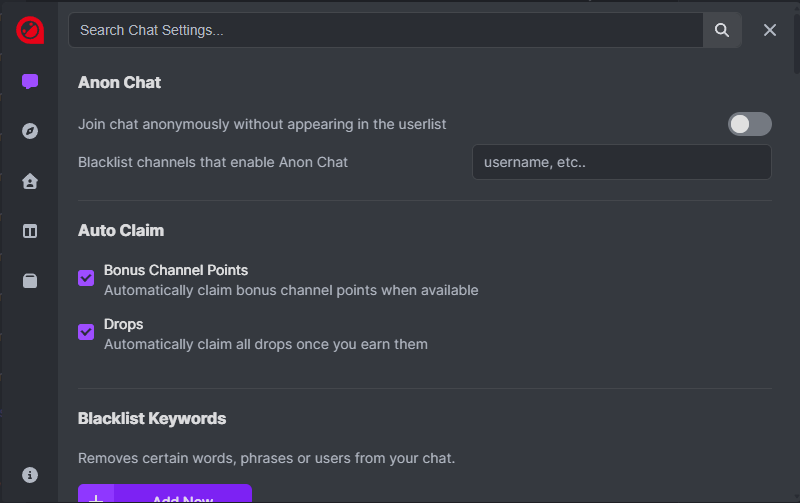
 | This extension is a must if you watch Twitch, especially for the drops as this extension automatically claims channel points bonuses, drops, and moments! |
|---|
-
Install
-
To enable settings, navigate to twitch.tv
-
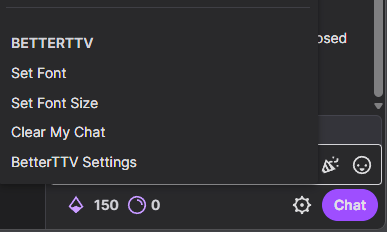
Watch any streamer and click the gear icon right below the chat box on the bottom right.
-
Click on “BetterTTV Settings” in the pop-up menu.
-
From there, you can enable settings like Auto Claim.
-
Sometimes the extension will glitch out on first enable. Be sure to restart your browser after enabling settings.
-
Enjoy!